map_scatter
Rule-based object scattering for games and tools.
Place assets across 2D maps and 3D surfaces using data-driven rules and sampling strategies.
Overview
map_scatter is a Rust workspace for fast, deterministic placement in 2D domains (or 2D projections of 3D worlds). It answers a simple question: given a domain and a set of rules, where should each kind of thing appear? You describe rules as field graphs, pick sampling strategies, and get placements you can turn into entities, props, decals, or tooling data.
What you can build
- World detail layers: trees, rocks, grass, debris, decals, and props.
- Gameplay distribution: resources, pickups, spawn points, and points of interest.
- Authoring tooling: bake placements or masks for editors and pipelines.
- Layered effects: use overlays to drive secondary passes like ground cover.
Use in 2D, 2.5D, and 3D
- 2D: treat the domain as your map; placements are
Vec2world positions. - 2.5D: run on a 2D domain, gate by height or slope textures, then lift placements to 3D using a heightmap or raycast.
- 3D: project your surface into 2D (terrain UVs or top-down projection), run a scatter pass, then convert placements back to 3D and align to normals. For multiple surfaces, run multiple passes.
The workflow is always the same: project to a 2D domain, scatter, then lift back to your world.
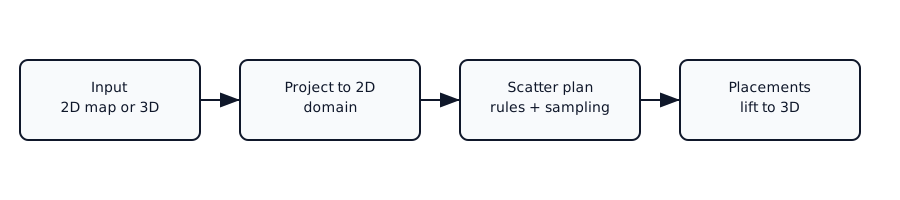
See the 2D, 2.5D, and 3D usage guide for practical workflows.
Why map_scatter
- Rule-based placement: author fields and gates instead of hand-coded loops.
- Multiple sampling strategies: blue-noise, grids, clustered, low-discrepancy, and more.
- Deterministic results: same inputs + seed = identical output.
- Layered control: order kinds, reuse overlays, and compose rules.
- Scales to large worlds: chunked evaluation and caching keep runs predictable.
Typical workflow
- Define one or more kinds with field graphs.
- Pick a sampling strategy per layer.
- Assemble layers into a plan.
- Run the plan with textures, cache, and a run configuration.
- Use placements and optional overlay masks to drive your game or tooling.
Scope
map_scatter focuses on placement logic. It does not render, generate terrain, or manage assets for you. You supply the domain, textures, and the logic that turns placements into entities or gameplay. It also does not provide full volumetric 3D scattering out of the box; treat it as a surface or projection based system.
Choose your entry point
- Core library: use
map_scatterdirectly in Rust tools or pipelines. - Bevy plugin: use
bevy_map_scatterfor asset-driven authoring and ECS integration.
Project layout
- Core library:
crates/map_scatter - Bevy integration:
crates/bevy_map_scatter - Examples:
crates/map_scatter_examplesandcrates/bevy_map_scatter_examples
Links
- API docs: https://docs.rs/map_scatter
- Crate: https://crates.io/crates/map_scatter
- Repository: https://github.com/morgenthum/map_scatter